Cloud agent setup
Give your cloud agent a flywheel.
Prebuilt tools for tasks, coordination, code checks, memory and reusable skills, installed in your provider's setup phase. Hand the setup to a browser agent, or follow the illustrated guide.
2Pick how to set it up
Recommended
Let a browser agent set it up
Copy one complete brief and paste it into a ChatGPT chat with computer use enabled, or any agent that can operate your browser. It follows every click, fills in the scripts and asks before sign-ins or policy changes.
Every step, field value, script and verification check for Claude Code, in one paste.
- tools11 executables
- 10
- Claude installhosted run
- 12s
- secretsno source builds
- 0
- download hostsboth public
- 2
Know your way around? That is the entire Claude setup script. The guide shows the exact field.
#!/bin/bash
(
acfs_cloud_setup="$(curl -q -fsSL --proto '=https' --proto-redir '=https' --connect-timeout 5 --max-time 20 -A 'OpenAI File Downloader, XaiImageApiFetch/1.0' -H 'Accept-Encoding: identity' https://raw.githubusercontent.com/Dicklesworthstone/agentic_coding_flywheel_setup/main/scripts/claude-code-web-setup.sh)" || { printf '%s\n' 'ACFS cloud bootstrap download failed; tools were not installed. Check network access and retry.' >&2; exit 0; }
printf '%s\n' "$acfs_cloud_setup" | bash
)
Illustrated guideHosted test
Set up Claude Code
Create an environment, add the flywheel setup, then select it when starting your task.
Four actual UI screenshots. The form screenshots show the fields before you fill them in. Checked 8 Oct 2026.
What is verified. Full and default Trusted hosted runs installed all eleven executables and passed Agent Mail MCP health. The cold Trusted run took 53 seconds using verified public fallbacks. Organization policies may still block those downloads; inspect the setup summary.
Step 1 of 6 · 0 done
Open the Cloud menu
Step 1 of 6
Open the Cloud menu
Open claude.ai/code. Above the task box, click the environment chip (Default in this example). Choose Cloud in the menu.
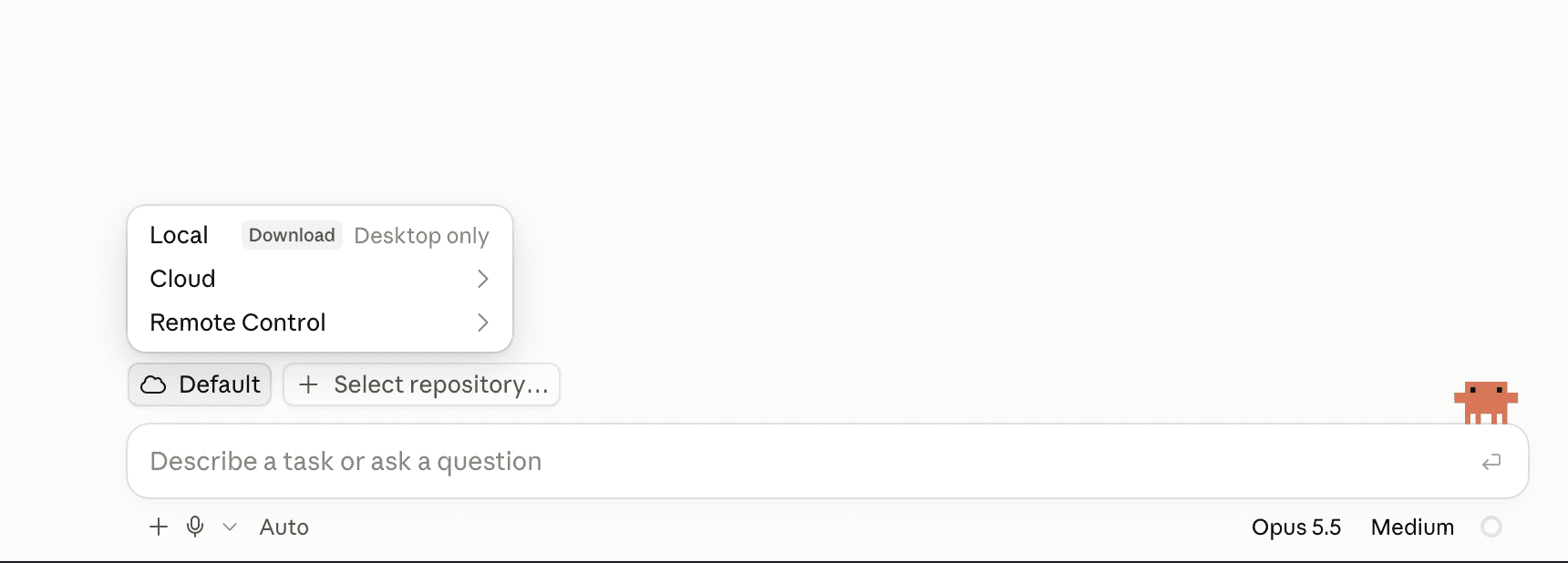
- Environment chip
- Cloud
1. Choose Cloud · Claude Code, 8 Oct 2026
Step 2 of 6
Choose Add cloud environment…
In the Cloud submenu, click Add cloud environment… at the bottom of the list. To update an existing environment, open its configuration instead.
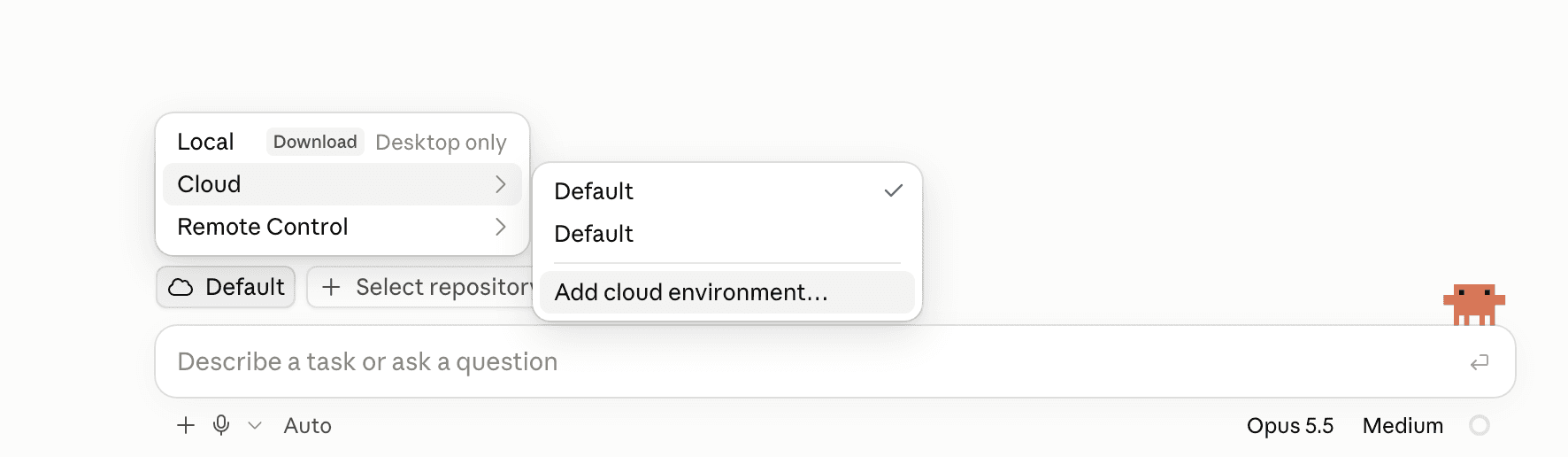
- Add cloud environment…
2. Add a cloud environment · Claude Code, 8 Oct 2026
Step 3 of 6
Name it and choose network access
In Name, enter Flywheel (or any name you will recognize). Open Network access and choose Full for the simplest setup.
For a narrower policy, choose Custom, allow the two hosts below and tick Also include default list of common package managers so your project's own installs still work. The default Trusted also works: the mirror is blocked there, so setup uses verified public GitHub fallbacks. If your organization blocks those downloads, the setup summary names the missing tools.
Where this goes
- Name
- Flywheel
- Network access
- Full, or Custom with the two hosts
Custom allowed domainstextraw.githubusercontent.com downloads.agent-flywheel.com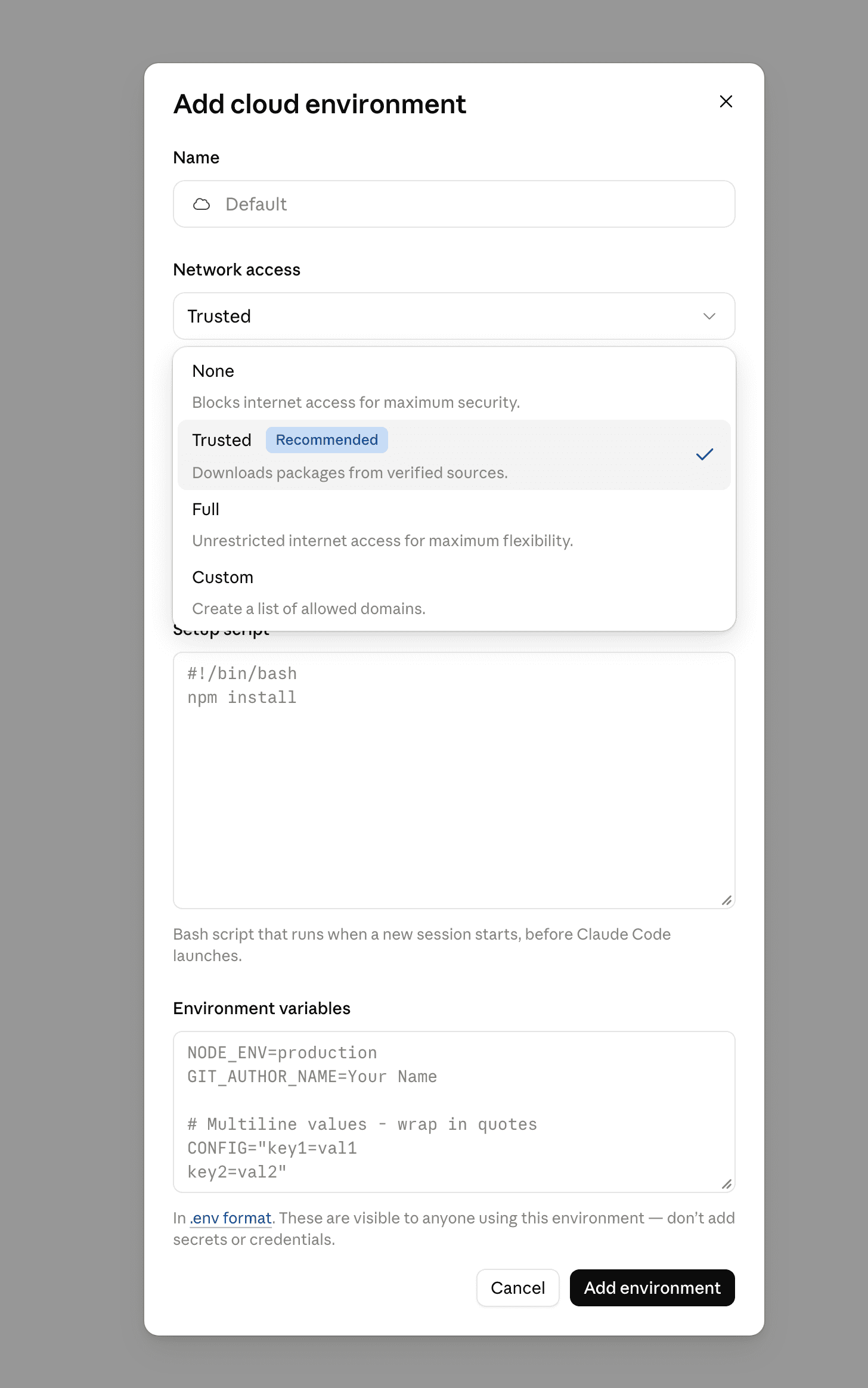
- Name
- Full
3. Full and Custom are in Network access · Claude Code, 8 Oct 2026
Step 4 of 6
Paste into Setup script
Copy the script below into the Setup script field. The npm install text in the screenshot is a placeholder, not the flywheel script.
If you already have project setup commands, keep them and add the flywheel download line after them. No network secret or environment variable is required for these public downloads.
Where this goes
- Destination
- Setup script
Setup scriptbash#!/bin/bash ( acfs_cloud_setup="$(curl -q -fsSL --proto '=https' --proto-redir '=https' --connect-timeout 5 --max-time 20 -A 'OpenAI File Downloader, XaiImageApiFetch/1.0' -H 'Accept-Encoding: identity' https://raw.githubusercontent.com/Dicklesworthstone/agentic_coding_flywheel_setup/main/scripts/claude-code-web-setup.sh)" || { printf '%s\n' 'ACFS cloud bootstrap download failed; tools were not installed. Check network access and retry.' >&2; exit 0; } printf '%s\n' "$acfs_cloud_setup" | bash )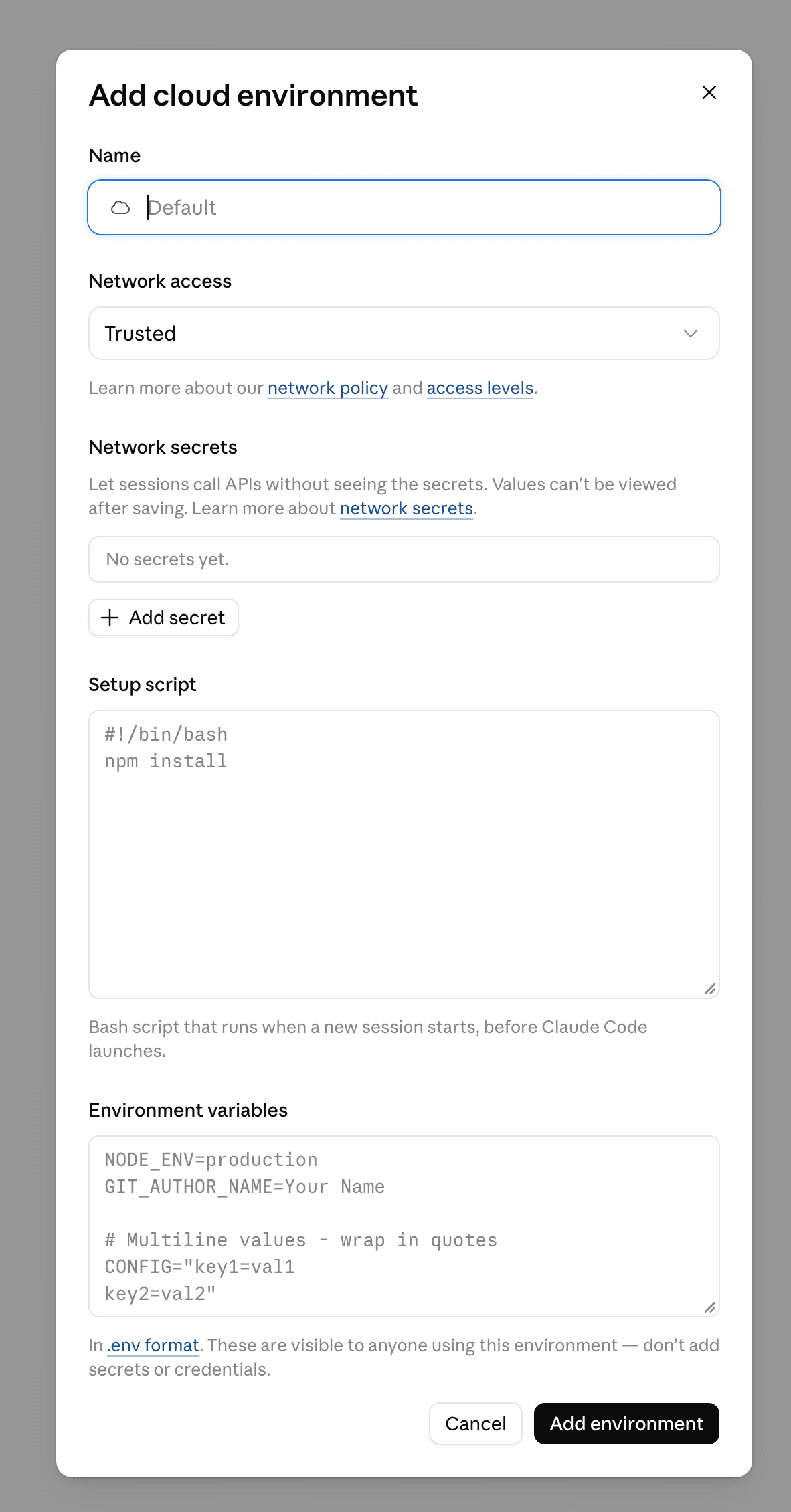
- Setup script
- Add environment
4. Paste into Setup script, then Add environment · Claude Code, 8 Oct 2026
Step 5 of 6
Add the environment and check a session
Click Add environment. Back at the composer, select Flywheel and your repository, then send a task. Setup runs before the agent starts.
Paste the request below into the task. Review failures in the setup log even when setup reports exit 0.
First task checktextRead $HOME/.acfs/cloud/setup.log and the generated tool guide. In the task shell, export PATH="$HOME/.local/bin:$PATH". Run --version for br, bv, am, mcp-agent-mail, ubs, cass, cm, ms, ast-grep, jsm and jfp. Report every missing or failed executable and the relevant setup-log reason. An exit-0 setup does not mean all tools installed. Also verify the registered Agent Mail stdio MCP server is healthy.Step 6 of 6
Use the same environment next time
For later tasks, choose Flywheel from Cloud and select the repository. Claude reads the managed tool guide from ~/.claude/CLAUDE.md.
After changing the setup script, start a fresh session and check the log again. Keep your project instructions and setup commands alongside the flywheel additions.
How installation works
Fast, verified, and honest about failures
Verified prebuilt tools
Every bundle is checked against cloud-mirror.json in the ACFS repository before extraction. Upstream checksums and available signatures were verified when the mirror was published. Nothing compiles and no upstream installer runs in your session.
Bounded setup time
Tool jobs run in parallel. Each has a 180-second deadline covering its download, install and version checks, so setup fits inside the provider's setup window.
Failures stay visible
The installer always exits 0, so one unavailable tool never blocks session startup. Read the summary and setup log: a finished script does not mean every tool installed.
Agent Mail without a daemon
Claude gets an on-demand stdio MCP server. Other recipes expose the Agent Mail CLI without starting a daemon or changing provider MCP settings.
A guide the agent can read
A managed instruction block lists working tools, commands and failures. Claude loads it automatically; other agents need the explicit guide-loading instructions in their recipe.
[acfs-cloud] ACFS cloud setup: br bv am ubs cass cm ms ast-grep jsm jfp ACFS ref: main, whole tool job timeout: 180s Installing br … Installing jfp # 10 parallel jobs Registered Agent Mail as the stdio MCP server 'mcp-agent-mail'[acfs-cloud] Summary (12s) br ‹version› (verified prebuilt) bv ‹version› (verified prebuilt) am ‹version› (verified prebuilt) ubs ‹version› (verified prebuilt) cass ‹version› (verified prebuilt) cm ‹version› (verified prebuilt) ms ‹version› (verified prebuilt) ast-grep ‹version› (verified prebuilt) jsm ‹version› (verified prebuilt) jfp ‹version› (verified prebuilt) Guide for claude: ~/.claude/CLAUDE.md; logs: ~/.acfs/cloud/logs/
Abridged from the script's real summary. Times are from our hosted runs; versions vary.
What gets installed
Ten tools that carry the work forward
11 executables from hash-pinned bundles, installed into .local/bin under your data root. Install a subset with ACFS_CLOUD_TOOLS.
Plan the work
Issues that live in the repo, triaged by what they unblock.
BeadsRust
brDependency-aware issues that live in the repo's .beads/ and travel with the code.
Beads Viewer
bv --robot-triageGraph-aware triage: what to work on next and what it unblocks.
Coordinate
Messages and file reservations between agents.
MCP Agent Mail
ammcp-agent-mailAgent messaging and file reservations. Claude gets stdio MCP registration; other agents get CLI access.
Check the code
Bug scans and structural search before a commit.
Ultimate Bug Scanner
ubs <files>Scans changed files for bugs before every commit.
ast-grep
ast-grepStructural code search and UBS scan dependency.
Remember
Search past sessions and recall learned procedures.
Session Search
cass search "query" --robotSearches the agent session history on this VM.
CASS Memory
cm context "task" --jsonProcedural memory pulled in before a task starts.
Skills and prompts
Reusable skills and a prompt library from the terminal.
Meta Skill
ms search "query" --robotInitialize a writable project, then index and search its local skills.
Jeffrey's Skills
jsmSkill manager for the jeffreys-skills.md library.
JeffreysPrompts
jfpThe battle-tested prompt library, from the terminal.
Network access
Two public download hosts
No credentials or repository ownership needed. Use full access, or allow these hosts in your provider's policy. Setup never falls back to a source build.
raw.githubusercontent.com
downloads.agent-flywheel.comWhat each level does, in Claude's terms. Other providers have equivalent settings.
FullWorks
The setting our Claude hosted run used. Everything comes from the public mirror.
CustomShould work
Allow the two hosts below and keep the provider's package-manager defaults so your own installs still work. This allowlist passed the ChatGPT hosted test; Claude's Custom mode has not been accepted.
TrustedTested
Our cold Claude run installed all eleven executables in 53 seconds through verified public GitHub fallbacks, including JSM. The mirror is blocked and UBS fetches its modules on first use. Organization policies may still block downloads; read the summary.
NoneNothing installs
Claude's one-line recipe still exits 0, so the session starts without the tools or a log. The Codex and Linux recipes fail so the problem is visible.
Reference
Scope and options
What this bundle leaves outMachine provisioning and the tools that need a long-lived host.
- Machine provisioningUsers, zsh theming, the Ubuntu upgrade, systemd services, Tailscale, PostgreSQL, Vault, and cloud CLIs belong to a long-lived VPS. A cloud VM is disposable and already has its toolchains.
- ntmThe tmux cockpit is outside this tool bundle. These recipes focus on commands an agent can call in task shells.
- dcgdcg works as a Claude Code hook. Cloud sessions run hooks from the repository's .claude/settings.json, not from user-level settings, and this installer never edits your repository.
- rchRemote compilation needs SSH access to your own build workers.
- caam, ru, slbAccount switching, multi-repo sync, and the two-person rule all assume a machine you keep using.
Options and environment variablesPick tools, a data root, a deadline or a pinned ref.
Set options inline on the bash side of the pipe, where the setup script sees them. Your Claude Code recipe, installing four tools:
#!/bin/bash
(
acfs_cloud_setup="$(curl -q -fsSL --proto '=https' --proto-redir '=https' --connect-timeout 5 --max-time 20 -A 'OpenAI File Downloader, XaiImageApiFetch/1.0' -H 'Accept-Encoding: identity' https://raw.githubusercontent.com/Dicklesworthstone/agentic_coding_flywheel_setup/main/scripts/claude-code-web-setup.sh)" || { printf '%s\n' 'ACFS cloud bootstrap download failed; tools were not installed. Check network access and retry.' >&2; exit 0; }
printf '%s\n' "$acfs_cloud_setup" | ACFS_CLOUD_TOOLS="br bv am ubs" bash
)- ACFS_CLOUD_AGENT
- Default: claude
- claude writes ~/.claude/CLAUDE.md and registers stdio MCP; codex writes a Codex guide; generic writes .acfs/cloud/AGENTS.md without provider configuration. Any other value installs nothing.
- ACFS_CLOUD_ROOT
- Default: $HOME
- Writable absolute data root (not /) for binaries and logs. In Codex mode a custom root also holds the explicitly loaded guide.
- ACFS_CLOUD_SKILL_DIR
- Default: unset
- Optional absolute Codex repository skill directory. Creates a tool-guide skill without replacing existing skills; hosted catalog loading still needs verification.
- ACFS_CLOUD_TOOLS
- Default: br bv am ubs cass cm ms ast-grep jsm jfp
- Which tools to install.
- ACFS_CLOUD_TIMEOUT
- Default: 180
- Deadline in seconds, from 1 to 180, for each tool's job: download, install and version checks. Jobs run in parallel; an out-of-range value installs nothing.
- ACFS_CLOUD_REINSTALL
- Default: 0
- Set to 1 to reinstall tools already on PATH, e.g. to update inside a running session.
- ACFS_REF
- Default: main
- The ACFS git ref whose cloud-mirror.json pins prebuilt bundle hashes.
Want the whole stack?
The cloud script covers the tools an agent calls. A VPS of your own gets everything: the shell, tmux, every agent CLI, and the services that keep running between sessions.